QR Code Print Checker & Sizing Calculator
Avoid costly reprint disasters. Validate your physical QR dimensions, module widths, and DPI resolution before sending files to the print shop.
Print Readiness & Physical Size Calculator
Ensure your printed QR codes scan reliably on business cards, menus, flyers, and banners using the optical 10:1 camera distance rule and commercial 300 DPI standards.
Marginal Print Size (Warning)
Your size: 22 mm. Minimum needed at 25 cm: 25 mm.
Prepress Print Guide
Always use vector SVG format for commercial printing to maintain sharp mathematical edges and prevent raster pixelation.
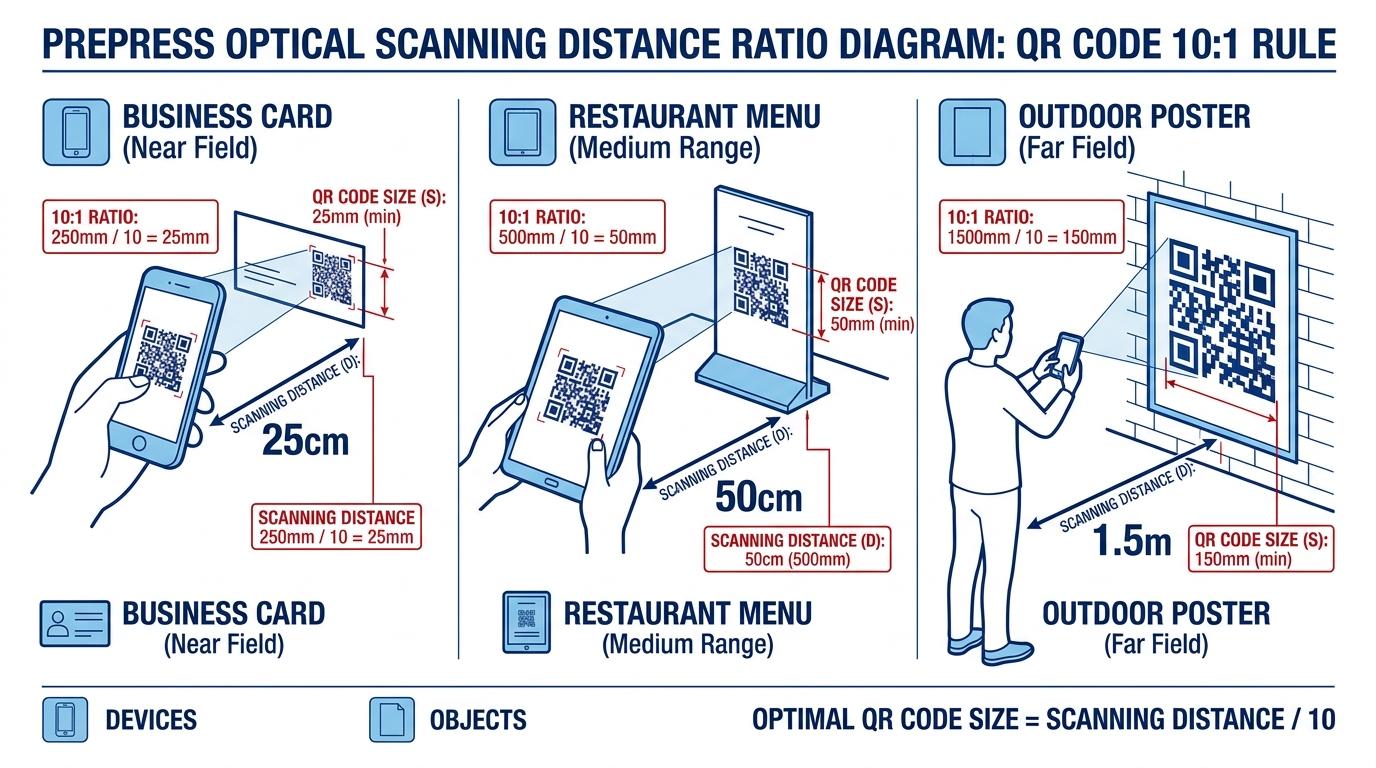
The minimum physical code size corresponds directly to scanning distance divided by 10 (e.g. 25 mm code for 250 mm reading distance).
Scan-tested in your browser
Built on the ISO/IEC 18004 standard with zero paywalls.
No Expiration for Static Codes
Direct static encoding with zero redirect intermediaries.
Private by Design
Your QR content is processed in your browser and never uploaded.
The Universal 10:1 Scanning Distance Rule Explained
Optical physics dictates that a smartphone camera lens needs a minimum field-of-view angle to resolve the 2D matrix. As a safe engineering rule of thumb, your physical QR code width should be at least 1/10th of the distance from which users will view it.
| Medium | Expected Distance | Minimum Size | Recommended Size |
|---|---|---|---|
| Business Card | 20 – 25 cm (Handheld) | 20 × 20 mm | 22 – 25 mm |
| Product Bottle / Label | 15 – 20 cm (Close) | 15 × 15 mm | 18 – 20 mm |
| Restaurant Table Tent / Menu | 35 – 50 cm (Across table) | 30 × 30 mm | 35 – 45 mm |
| A5 / A4 Flyer or Magazine | 30 – 40 cm (Arm length) | 25 × 25 mm | 30 – 35 mm |
| Storefront Window Poster | 80 – 120 cm (Pedestrian) | 60 × 60 mm | 80 – 100 mm |
| Trade Show Backdrop / Banner | 200 – 300 cm (Hallway) | 150 × 150 mm | 200 – 250 mm |
Everything You Need to Know About QR Codes
Clear, honest answers about static encoding, optical scannability, printing, and privacy.
How do static QR codes work and why do they never expire?
A static QR code encodes your exact destination data (such as a website URL, Wi-Fi network credentials, or vCard contact card) directly into the black and white 2D matrix modules using the ISO/IEC 18004 standard. Because there are no middleman redirect servers involved, the code functions indefinitely as long as your website remains online. There are no trial periods, no renewal dates, and zero monthly fees.
Do smartphone users need a dedicated scanner app?
No. The default camera applications on all modern Apple iOS (iPhone) and Google Android devices decode standard QR barcodes natively. Simply opening the camera and pointing it at the printed code displays an instant actionable prompt banner.
Can I use these QR codes commercially for my business?
Yes. All QR codes generated on HD QR Code are free to use for personal and commercial applications, including product packaging, restaurant tabletop menus, billboard advertisements, business cards, and marketing collateral with no account required.
What is the difference between static and dynamic QR codes?
Static QR codes store your exact raw link directly in the physical modules with zero third-party dependencies. Dynamic QR codes store an intermediate redirect URL pointing to a service provider cloud server. Many generators use temporary dynamic codes that can expire or require a paid plan.
What types of content can I encode into a static QR code?
You can encode 24 distinct content formats, including website links, Wi-Fi network access keys, vCard digital business cards, direct phone calls, SMS messages, pre-formatted emails, calendar event invitations, Google Maps directions, and cryptocurrency addresses.
Will my QR code stop working if your website is offline?
No. Once downloaded, your static QR code is completely independent of our website or servers. The optical data pattern directly encodes your destination address, meaning it functions forever without communicating with any external platform.
Can I change the destination of a static QR code after printing?
No. Because static codes embed destination data physically within the matrix pattern, the encoded content is permanent once printed. To update your destination, you can either configure a server redirect on your own domain or generate a new code before starting large print runs.
How many times can a static QR code be scanned?
There is no scan limit. Static QR codes can be scanned an unlimited number of times by millions of devices because each scan is an offline optical read executed directly by the user camera lens without server gatekeeping.